
Outpost Packet Message Manager
What is MD5 and why is it here?
Introduction
The current Outpost installation program is not digitally signed. When you run it, Windows will produce the following error message:
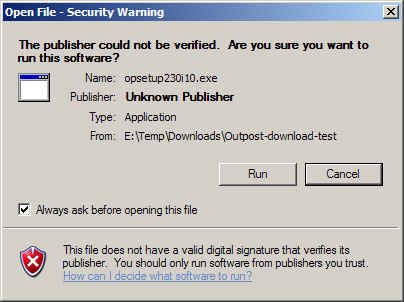
Digitally signing ensures the end user that the program or code they are downloading has not been tampered with or altered. Digital signing is based on Microsoft Authenticode® technology, and enables users and the operating system to verify that program code comes from the rightful owner.
While this is a great idea, Digital signing is not free and can cost a couple of hundred dollars a year for the service.
Where WinMD5 comes in
WinMD5.exe is a freeware program for Windows that implements the MD5 algorithm. This program produces a 16 byte ''fingerprint'' of whatever it is aimed at that can then be used to confirm that the file posted up on a website is the file you expect. This is the approach I am taking here.
Your use of WinMD5.exe is strictly optional. There is no requirement to confirm the integrity of the installation program file. However, if you are concerned, I recommend you follow the following steps:
-
Download the WinMD5 zip file from a public download site.
-
Unzip the WinMD5 contents into a temp directory.
-
If desired, virus scan the unzipped files with whatever tool you have on your PC.
-
Download the Outpost installation program from the Outpost download area.
-
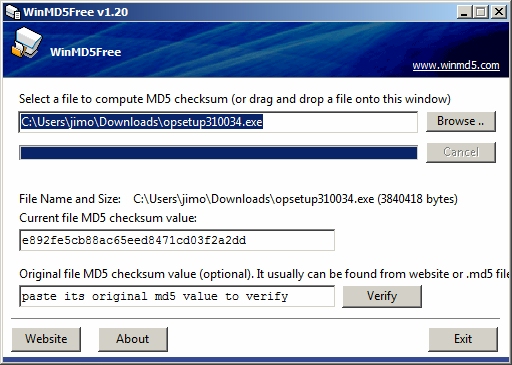
Run WinMD5. Browse for to find the Outpost installation program you just downloaded.
-
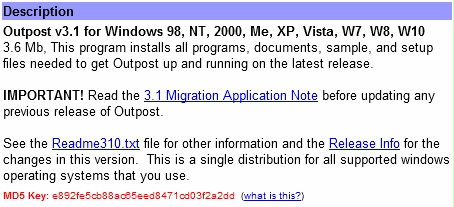
Once selected, the MD5 result is displayed. Compare the displayed 32 character result with that found on the Outpost download area, Description section, last line for the Outpost installation program.
-
If they match, you can confidently run the install program and disregard the Security warning.
-
If they do not match, contact me at the email address below.
General Feedback
Please send any feedback to
updated: January 15, 2016