
Outpost Packet Message Manager
HOW-TO... Setting up a BBS, Santa Clara County RACES
Setting up a BBS, Santa Clara County RACES
INTRODUCTION
BBS Setup is required to describe specific aspects of the BBS that Outpost needs to know about. For Santa Clara County RACES, a custom version of the AA4RE BBS exists that requires a slightly different setup step. This HOW TO describes that difference.
HOW TO
To set up for the Santa Clara County RACES W6XSC-1 BBS, proceed as follows:
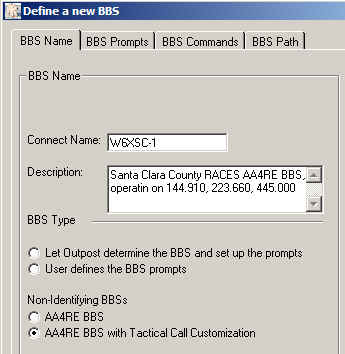 Review the message titled... "HOW TO: Setting up a BBS"
- From Outpost, select Setup > BBS, Tab 1
- Enter the connect Name = W6XSC-1
- Enter a description (optional)
- Set the BBS Type to "AA4RE BBS with Tactical Call Customization"
- From Outpost, select Setup > BBS, Tab 3
Leave these as the defaults.
- From Outpost, select Setup > BBS, Tab 4
The default option is is Direct (your station directly connects to the BBS). If you are using a Digipeater, check that box, and list the digipeat stations separated by commas. For KA or Netrom node access, see the HOW-TO on KA-Node/Netrom Access for details.
- Press OK.
- Outpost will then bring up the Setup
> Identification form.
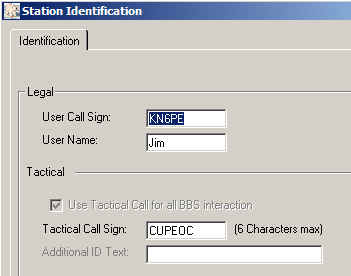 - Confirm or enter your FCC call sign and your name.
- Enter your City's Tactical Call. See your Emergency Coordinator for details.
- Press OK
- Set up the TNC (see that HOW TO on Setting up a TNC)
- Set up retrieve options: Tools > Send/Receive
Settings, Tab 2.
- Check "Retrieve Private Messages"
- Check "Retrieve New Bulletins"
- At this point, you should be able ready to connect to the County BBS. Press Send/Receive and confirm that Outpost connects, sends any outgoing messages, retrieves any messages addressed to you, and then exits.
General Feedback
Please send any feedback to
updated: October 12, 2008